

Navigating the Platform
This guide walks you through the key areas of the platform so you can hit the ground running.
On desktop, everything you need is accessible from the Home menu on the left-hand side of the screen:
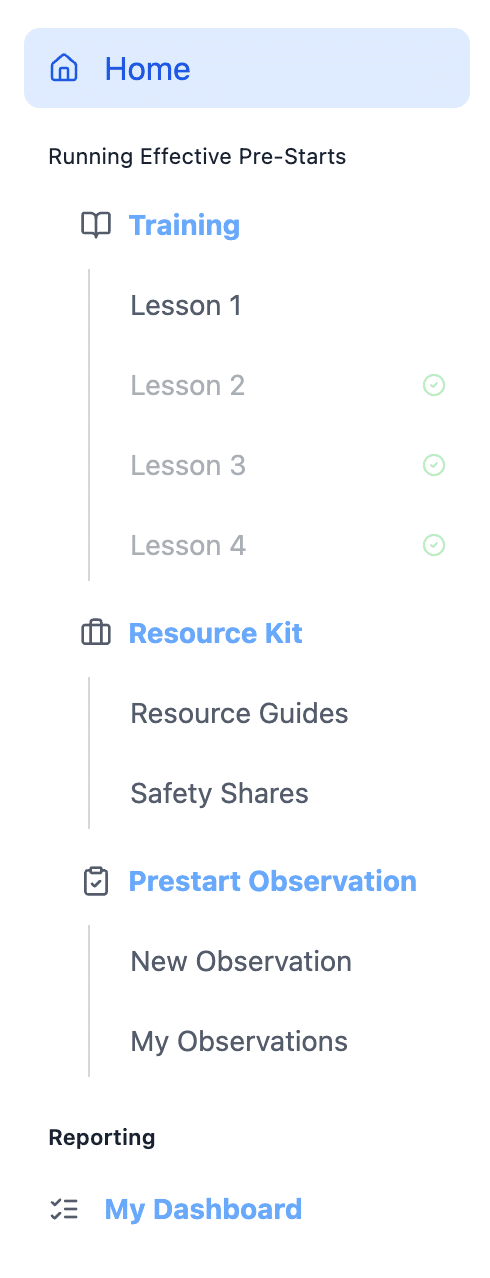
On mobile devices, use the hamburger menu from the top left of the screen, below the Sentis logo:

Training
The Training section is your starting point. It contains a series of short lessons designed to build your knowledge and refresh concepts.
Each lesson follows the same simple structure. It opens with a short video, typically around two minutes, that introduces the core idea. After the video, a Key Concepts section gives you a concise reading to reinforce what you’ve just watched. Each lesson then closes with a Knowledge Check, a short quiz to test your understanding.
As you work through the series, completed lessons are marked with a tick in the menu, so you can easily see where you’re up to. The lessons are designed to be completed in order, with each one building on the last.
Once you’ve completed the lessons, you’ll be prompted to complete a Post-Lesson Confidence Check, a short five-question assessment that helps measure your progress and embed the learning over time.
Resource Kit
The Resource Kit is your self-service library of supporting materials, divided into two areas: Resource Guides and Safety Shares.
Resource Guides
Resource Guides is a curated collection of downloadable documents and videos you can access at any time.
The guides are designed to be used practically: review the materials, adapt them to suit your team and use them as ongoing reference tools.
Safety Shares
Safety Shares is a library of 101 ready-to-use safety share topics, purpose-built to help you run engaging and varied pre-start conversations. Each one is presented slide by slide and includes supporting notes to help you facilitate the discussion confidently.
You can browse the full library, search for a specific topic or use the Random Share button to let the platform pick one for you, a great option when you want some variety.
After viewing each safety share, you’re invited to rate how useful you found it, from Poor through to Excellent. These ratings help us continuously improve the content, so your feedback genuinely makes a difference.
Pre-Start Observation
The Pre-Start Observation tool helps leaders observe, evaluate and improve the quality of pre-start meetings across the team. It works both online and offline, so you can use it in the field even without an internet connection, and anything captured offline syncs automatically once you’re reconnected. Simply press Sync Now to push your saved observations through.
New Observation is where you complete a structured form after watching a pre-start. It captures the key meeting details, including the leader’s name, date, time, location and crew size, then guides you through a set of observable behaviours to evaluate, such as whether the meeting felt organised or improvised, whether the crew was engaged or passive, whether the leader asked questions or mostly talked, and whether people left with a clear message and action. You also give an overall rating and can add comments and media such as photos, audio or video.
The form is guided by a Competency Framework and includes tips on how to give feedback constructively, helping observers share their input in a way that’s useful and respectful.
My Observations is a log of every form you’ve submitted. You can search and filter by leader, location, date range or rating, and export the data as a CSV if you need to.
Need more help?
Reach out to us at help@sentis.com.au